
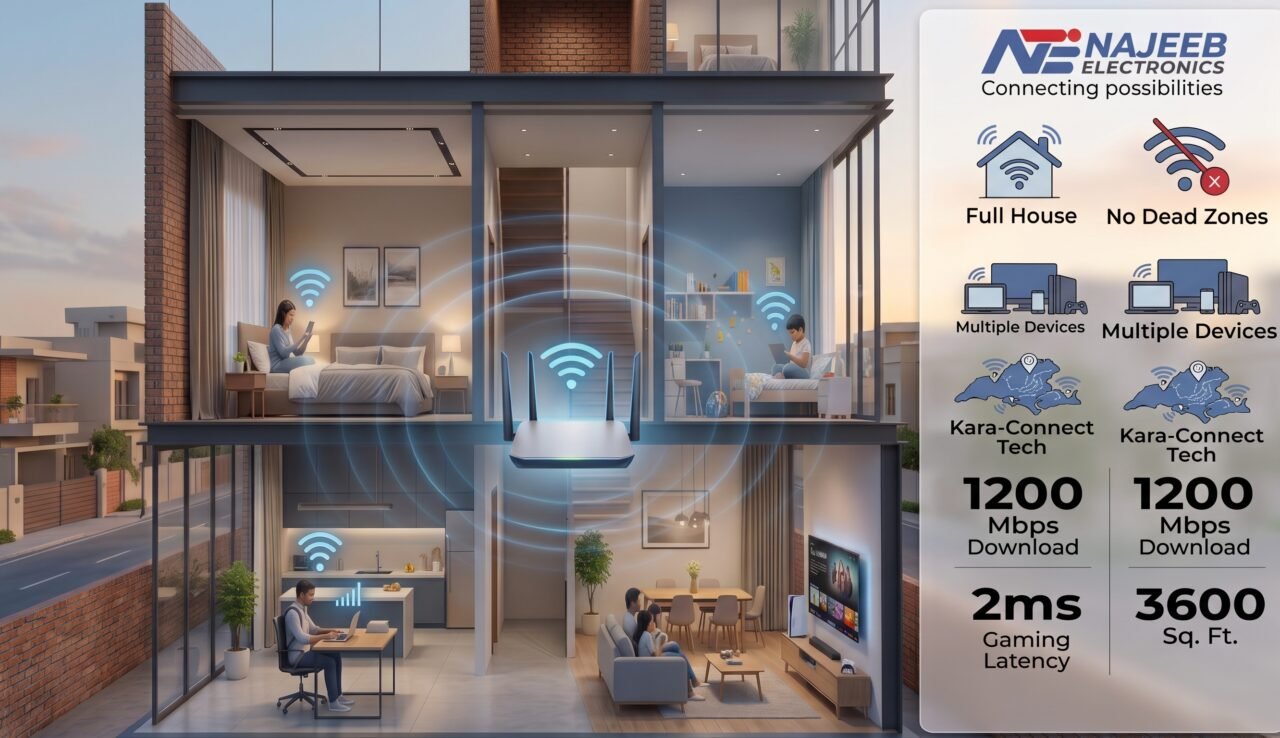
A weak WiFi signal can turn a comfortable home into a frustrating experience. One room has excellent internet, while another struggles with slow loading, buffering, or dropped video calls.The problem becomes even more noticeable in multi-story homes, where concrete walls, floors, furniture, distance, and multiple connected devices can weaken the WiFi signal.The good news is that you may not need a faster internet package. In many cases, you simply need a better WiFi network.
That is where WiFi 6 routers and Mesh WiFi systems can make a difference.If you’re searching for the Best WiFi 6 Routers & Mesh WiFi Systems in Pakistan (2026), this guide will help you understand which solution is right for your home and how to eliminate WiFi dead zones.
Why Does WiFi Become Weak in Multi-Story Homes?
A single router can provide excellent coverage in a small apartment. But as the distance increases, the wireless signal becomes weaker.In a multi-story house, the signal may need to travel through concrete walls and floors to reach bedrooms, offices, or entertainment areas.
Common causes of WiFi dead zones include:
 Multiple floors
- Long distances between rooms
- Metal objects and appliances
- Too many connected devices
- Poor router placement
- Interference from nearby WiFi networks
- Older routers with limited capacity
- Thick concrete walls
The result can be slow browsing, buffering, unstable video calls, and high ping while gaming.
What Is WiFi 6?
WiFi 6, also known as 802.11ax, is designed to provide better efficiency and performance than older WiFi generations.Instead of focusing only on maximum speed, WiFi 6 is designed to handle multiple connected devices more efficiently.Modern homes may have smartphones, laptops, smart TVs, gaming consoles, cameras, tablets, and smart appliances connected at the same time.Technologies such as OFDMA and MU-MIMO help compatible devices communicate more efficiently, making WiFi 6 a strong choice for busy households.

Why Choose WiFi 6?
WiFi 6 is a good choice if you:
- Have many connected devices
- Stream HD or 4K content
- Work from home
- Play online games
- Use multiple smart home devices
- Want better network efficiency
- Are upgrading from an older WiFi router
What Is a Mesh WiFi System?

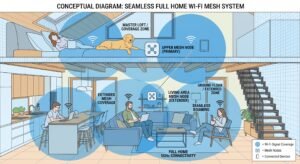
A Mesh WiFi system uses multiple units, often called nodes, to create one connected wireless network throughout your home. Instead of expecting one router to cover every room, you can place additional Mesh units on different floors or in areas where coverage is weak.
For example:
Main Router → Ground Floor Mesh Unit → Upper Floor Mesh Unit → Bedrooms
The Mesh units work together to provide more consistent coverage, while compatible systems can allow your devices to move between nodes without manually switching networks. This makes Mesh WiFi particularly useful for large and multi-story homes. Unlike traditional Wi-Fi extenders, which often create a separate network name and cause dead zones during handoff, Mesh systems maintain a single SSID, ensuring smoother roaming, better signal strength, and fewer dropped connections as you move around your property.
WiFi 6 Router vs Mesh WiFi: Which One Should You Choose?
The right choice depends on your home’s size and layout. A single WiFi 6 router works well for small to medium homes, while a Mesh WiFi system is better suited for larger, multi-story properties.
Choose a WiFi 6 Router If:
A single WiFi 6 router may be enough if:
- You live in a small or medium-sized home
- Most rooms are close to the router
- You don’t have major dead zones
- You want a simple setup
- You have a limited budget
For example, the TP-Link Archer AX53 is a WiFi 6 router with EasyMesh support, giving you the option to expand your coverage later with compatible devices.
Choose a Mesh WiFi System If:
Mesh WiFi is usually better when:
- Your home has multiple floors
- Some rooms have weak or no WiFi
- You have a large house
- Many devices are connected
- You want whole-home coverage
- You want seamless roaming between areas
For a multi-story home, Mesh WiFi can be a more practical solution because additional nodes can be positioned closer to areas that need better coverage.
Best WiFi 6 Routers & Mesh WiFi Systems in Pakistan (2026)
Najeeb Electronics offers several networking solutions for different home sizes, performance requirements, and budgets—helping you find the right router or Mesh system for your space.
1. TP-Link Deco X10 – Great for Whole-Home Coverage
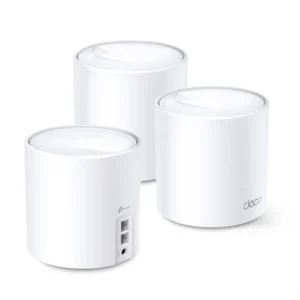 The TP-Link Deco X10 AX1500 WiFi 6 Mesh System is a good option for users who want to upgrade from a traditional router to Mesh WiFi.The listed 3-pack provides coverage of up to 5,600 sq. ft. and supports up to 120 connected devices.It also supports features such as OFDMA, MU-MIMO, Beamforming, and AI-driven Mesh technology.
Why Consider Deco X10?
- WiFi 6 technology
- Whole-home Mesh coverage
- Up to 5,600 sq. ft. listed coverage
- Supports up to 120 devices
- One unified network
- Suitable for streaming and gaming
2. TP-Link Archer AX53 – Best Single Router for Small to Medium Homes
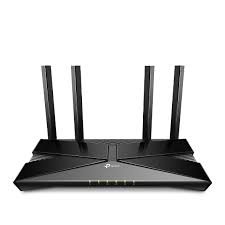 The TP-Link Archer AX53 AX3000 WiFi 6 router is a solid choice for smaller homes or apartments that don’t need multiple Mesh nodes. It supports EasyMesh, so you can add compatible units later if your coverage needs grow.
Why Consider the Archer AX53?
- AX3000 WiFi 6 speeds
- EasyMesh support for future expansion
- Ideal for small to medium homes
- Budget-friendly single-unit setup
3. TP-Link Deco X60 – For Larger Homes & More Devices
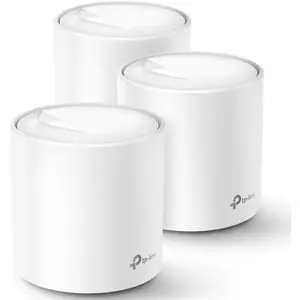
The TP-Link Deco X60 AX3000 WiFi 6 Mesh System is designed for users who need more performance and capacity.The listed 3-pack provides up to 7,000 sq. ft. coverage and supports more than 150 devices.It can be a strong option for busy households where several people are streaming, gaming, working, and browsing at the same time.
Why Consider Deco X60?
- AX3000 WiFi 6 performance
- Up to 7,000 sq. ft. listed coverage
- Supports 150+ devices
- Whole-home Mesh coverage
- Suitable for demanding households
- Expandable Mesh system
How to Eliminate WiFi Dead Zones in a Multi-Story Home
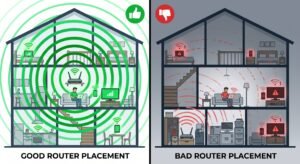
Buying a powerful router is only part of the solution. Router placement matters too.
1. Place Your Router in a Central Location
Avoid placing your router inside a cabinet, behind furniture, or in a far corner, since enclosed spaces and thick walls can significantly weaken signal strength before it even reaches the rest of your home. A central and elevated position, ideally on a shelf or mounted higher up, can help distribute the WiFi signal more evenly across multiple rooms and floors rather than concentrating coverage in just one direction.
2. Place Mesh Nodes Correctly
Don’t place a Mesh node deep inside an area where there is already no signal, since the node needs a strong enough connection from the main router to actually extend coverage rather than simply repeating a weak one. Instead, place it roughly halfway between the main router and the weak coverage area, allowing it to pick up a solid signal while still pushing reliable WiFi into the rooms that previously struggled to connect.
3. Consider Wired Backhaul
If you have Ethernet cables already running between floors, connecting Mesh nodes through Ethernet can provide a more stable backhaul than relying purely on wireless connections between units. This approach reduces the load on your WiFi bands, often resulting in faster and more consistent speeds for connected devices, especially in larger homes where multiple nodes are working together.
4. Reduce Interference
Keep your router away from microwaves, large metal objects, thick obstructions, and other wireless networking equipment where possible, since these can all disrupt or weaken your wireless signal in ways that aren’t always obvious. Even everyday household items like mirrors, aquariums, and concrete walls can contribute to signal loss, so it’s worth testing a few different spots to see where your router performs best.
How Many Mesh Units Do You Need?
There is no universal answer.
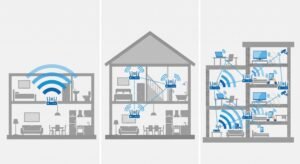
A small apartment may need one router, while a medium-sized home may benefit from two Mesh units. A large multi-story property may require three or more units depending on its layout and construction.
Before buying, consider:
- Home size
- Number of floors
- Number of connected devices
- Internet speed
- Wall thickness
- Required coverage
Don’t simply choose the system with the biggest coverage number. Choose according to your actual home and network requirements.
WiFi 6 for Gaming, Streaming & Work From Home
Modern homes have more connected devices than ever.Someone may be gaming while another person is watching Netflix, while someone else is attending a video meeting.WiFi 6 is designed to handle these busy environments more efficiently.For gamers, stable connectivity and low latency are important. For remote workers, reliable video calls matter. For families, strong coverage helps reduce buffering and connection drops.The goal isn’t simply the fastest router. It’s the right network for your home.
Mesh WiFi vs WiFi Extender: Which Is Better?
A WiFi extender can be useful for expanding coverage in a small area.However, Mesh WiFi is designed as a more integrated whole-home solution. Multiple Mesh nodes work together as one network and can provide smoother movement between coverage areas.If you have multiple dead zones across multiple floors, a Mesh WiFi system is often a better long-term solution than using several separate extenders.
What Should You Look for When Buying a WiFi 6 Router in Pakistan?
Before buying a WiFi 6 router or Mesh system, consider:
Home Size
A small apartment has different requirements from a large multi-story home, since a single router may comfortably cover a 2-bedroom flat but struggle to reach every corner of a larger house with multiple floors.
Number of Devices
Consider smartphones, laptops, TVs, cameras, consoles, and smart home devices, as households in Pakistan are increasingly connecting a dozen or more devices at once, which can slow down networks that aren’t built to handle that kind of load.
Internet Speed
Choose networking hardware that makes sense for your internet connection, since pairing a high-end WiFi 6 router with a slower broadband package won’t actually improve your real-world browsing or streaming speeds.
Coverage
Consider walls, floors, construction materials, and router placement—not just advertised coverage, since concrete and brick walls common in Pakistani homes can significantly reduce a router’s effective range compared to lab-tested figures.
Mesh Compatibility
If you may need more coverage later, consider a router that supports Mesh expansion, giving you the flexibility to simply add extra nodes down the line instead of replacing your entire networking setup as your home or needs grow.
Security
Features such as WPA3, guest networks, and parental controls can add useful protection and control, helping safeguard your network from unauthorized access while giving you the ability to manage what visitors and children can access online.
Why Choose Najeeb Electronics?
Choosing the right networking product is about more than finding the highest advertised speed.Najeeb Electronics offers networking solutions from leading brands for homes, offices, businesses, and larger network deployments.Whether you need a WiFi 6 router, Mesh WiFi system, access point, fiber networking equipment, or other networking solutions, choosing the right product for your actual requirements can help you get better performance and value.
Final Verdict: Which WiFi Solution Is Right for You?
If you live in a small home and your current router provides sufficient coverage, a powerful WiFi 6 router may be all you need.If you have a large or multi-story home with several weak-signal areas, a Mesh WiFi system is usually the better choice.
The TP-Link Deco X10 is a practical option for whole-home coverage, while the Deco X60 offers greater capacity for larger and busier networks. For advanced installations, the connectivity and flexible installation options.The best choice depends on your home size, floor plan, number of devices, internet speed, and usage requirements.A good WiFi network should simply work—from the ground floor to the bedroom, from video calls to gaming, without constantly worrying about dead zones.
Frequently Asked Questions
Is WiFi 6 worth it in 2026?
Yes. WiFi 6 remains a strong option for homes with multiple connected devices because it offers improved efficiency and capacity compared with older WiFi generations.
Is Mesh WiFi good for a 2-story house?
Yes. Mesh WiFi can extend coverage to areas where a single router may struggle, making it a practical choice for two-story and multi-story homes.
How can I eliminate WiFi dead zones?
Start with better router placement. If dead zones cover multiple rooms or floors, consider a Mesh WiFi system or compatible additional access points.
How many Mesh routers do I need?
It depends on your home’s size, layout, construction, and number of floors. A small home may need one or two units, while larger properties may require more.
Can Mesh WiFi be used for gaming?
Yes. A properly configured Mesh WiFi system can provide stable coverage for gaming. When possible, a wired Ethernet connection can provide even more consistent latency.
Get the Right WiFi Solution for Your Home

Looking for the Best WiFi 6 Routers & Mesh WiFi Systems in Pakistan (2026)?
Najeeb Electronics provides networking and WiFi solutions for homes, offices, businesses, and larger infrastructure requirements across Pakistan.
Website: www.najeebelectronics.com
Email: contact@najeebelectronics.com
WhatsApp: Chat on WhatsApp
Phone: 0321-2868177
Address: Shop 2-3, Amir Market, Sohrab Katrak Road, Saddar,Karachi Pakistan.
Ready to eliminate WiFi dead zones? Choose the right WiFi 6 router or Mesh WiFi system and enjoy reliable connectivity throughout your home.