


Description
Ubiquiti LiteBeam M5 (LBE-M5-23) — Long-Range 5GHz Wireless Bridge
The Ubiquiti LiteBeam M5 (LBE-M5-23) is a long-range outdoor wireless bridge designed for point-to-point and point-to-multipoint connections over the 5GHz band. Unlike a standard indoor router, it sends a wireless signal over long distances outdoors, commonly used to connect two buildings, extend internet to a remote location, or link a client site back to a wireless ISP’s tower.
For buyers in Pakistan needing a dependable outdoor bridge for WISP connections, CCTV backhaul, or long-distance links, the LBE-M5-23 is one of the most widely used devices in its class. It’s part of Ubiquiti’s airMAX product line, which has been a standard choice for outdoor wireless deployments for well over a decade.
Built-In Antenna and Long-Range Design
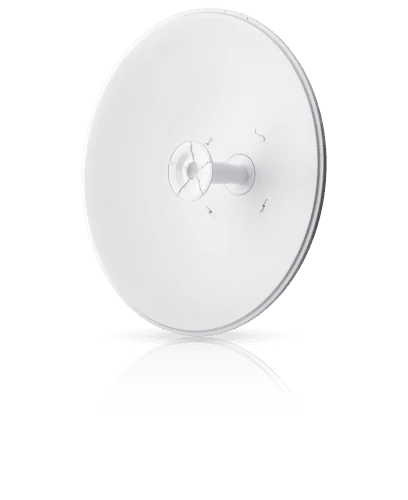
The Ubiquiti LiteBeam M5 integrates a 23 dBi antenna directly into its dish-style enclosure, giving it strong directional gain without needing a separate antenna setup. This built-in design keeps installation simple — mount it, aim it, and connect.
Operating in the 5150–5875 MHz frequency range (5725–5850 MHz in the USA), the Ubiquiti LiteBeam M5 is compatible with standard 5GHz outdoor deployments used across Pakistan’s WISP and enterprise networks. Its dish shape isn’t just cosmetic — the design helps focus the signal in a specific direction rather than broadcasting it broadly, which is what allows it to achieve long-range links, often several kilometers depending on line-of-sight conditions.
Processing Power for Stable Links
Inside, the Ubiquiti LiteBeam M5 (LBE-M5-23) runs on an Atheros MIPS 74Kc processor at 533 MHz, paired with 64MB of memory. This is enough processing power to maintain a stable, low-latency wireless link, which matters most for this type of device — a bridge needs to hold a consistent connection over distance, not run complex applications locally.
The onboard hardware also handles Ubiquiti’s airMAX protocol, which helps reduce interference and improve efficiency when multiple wireless links are operating in the same area.
Output Power and Signal Sensitivity
The Ubiquiti LiteBeam M5 (LBE-M5-23) delivers a maximum output power of 25 dBm, with TX power tapering slightly across higher modulation schemes — from 25 dBm at MCS0 down to 19 dBm at MCS7 — which is standard behavior as data rates increase. On the receiving side, sensitivity ranges from -97 dBm at the lowest modulation (MCS0) to -75 dBm at the highest (MCS7).
In practical terms, this means the Ubiquiti LiteBeam M5 (LBE-M5-23) can maintain a usable connection even at lower signal strength, making it more forgiving over longer distances or through minor obstructions compared to shorter-range equipment. A max VSWR (Voltage Standing Wave Ratio) of 1.5:1 also indicates efficient signal transfer between the radio and antenna, minimizing wasted power.
Simple Networking Interface
The unit includes a single 10/100 Ethernet port, used both for data connectivity and for power delivery. While this is a 10/100 port rather than Gigabit, it’s appropriate for the LiteBeam M5’s typical use case — built for backhaul links and remote site connectivity, not high-throughput core networking.
Most WISP and point-to-point deployments using this device are bandwidth-limited by the wireless link itself, not the wired port, so this isn’t usually a practical bottleneck.
Passive PoE for Simple Outdoor Installation
The Ubiquiti LiteBeam M5 (LBE-M5-23) is powered using Passive PoE, delivered through pairs 4/5 and 7/8 on the Ethernet cable, with a 24V 0.2A PoE adapter included in the box. This means only a single Ethernet cable needs to run to the unit, with no separate power line required at the mounting location — which significantly simplifies rooftop, pole, or tower installations.
Maximum power consumption is rated at just 4W, keeping the device efficient for continuous outdoor operation. Low power draw also means the Ubiquiti LiteBeam M5 (LBE-M5-23) generates minimal heat, which helps with long-term reliability in enclosed outdoor housings.
Rugged Design for Outdoor Deployment
The Ubiquiti LiteBeam M5 (LBE-M5-23) weighs 750g without the mount, measuring 362 × 267 × 184mm, with a compact dish-style form factor built specifically for outdoor exposure. It ships with a pole mounting kit included, so it installs directly on a mast, pole, or tower arm.
The device is rated to operate across an extreme temperature range, from -40°C to 70°C, making it suitable for Pakistan’s varied climate — from intense summer heat to colder winter conditions in northern regions. Its compact size also makes it easier to handle during installation compared to larger dish antennas, which matters for rooftop or tower-based deployments where space and access can be limited.
Configuration Through airOS
TheUbiquiti LiteBeam M5 (LBE-M5-23) runs on Ubiquiti’s airOS firmware, accessible through a standard web browser once connected. airOS provides tools for aligning the antenna using a built-in signal strength indicator, which simplifies the process of pointing the device accurately at a remote link partner, and it also includes airMAX prioritization settings that help maintain link quality when multiple devices are communicating with the same base station.
Basic configuration — setting IP addresses, wireless mode (Station or Access Point), and security settings — can typically be completed in a few minutes by someone with basic networking familiarity. For WISPs managing many devices, Ubiquiti also offers centralized management tools that can monitor and configure multiple LiteBeam units from a single dashboard.
Compliance and Build Quality
The Ubiquiti LiteBeam M5 (LBE-M5-23) carries FCC, IC, and CE certifications, along with RoHS compliance, indicating it meets recognized international standards for wireless emissions and environmental safety. These certifications are relevant if you’re deploying the device in a commercial or institutional setting where compliance documentation may be required.
Installation Considerations
Getting a strong, stable link from the Ubiquiti LiteBeam M5 (LBE-M5-23) depends heavily on line-of-sight between the two ends of the connection. Even minor obstructions — trees, buildings, or terrain — can noticeably affect signal quality, so planning the mounting location carefully is worthwhile before installation.
Mounting height also matters, since elevating the unit above surrounding obstacles generally improves both range and reliability. Since the device uses Passive PoE, it’s important to use a compatible PoE adapter — the one included in the box is matched to the unit’s power requirements, so substituting a different PoE source isn’t recommended. Cable quality also plays a role over longer outdoor runs; using weatherproof, properly rated Ethernet cable helps avoid degraded performance or moisture-related failures over time.
Common Use Cases for the LiteBeam M5
Given its long-range design and outdoor rating, theUbiquiti LiteBeam M5 (LBE-M5-23) fits several common scenarios. WISPs frequently use it as customer-premises equipment (CPE), connecting a subscriber’s location back to the provider’s access point or tower, while a pair of units can also bridge two buildings wirelessly when running physical cable isn’t practical.
It’s equally useful for remote site connectivity — farms, warehouses, or construction sites without easy wired internet access can use the LBE-M5-23 to pull a signal from a nearby tower. Remote CCTV and surveillance installations often rely on it to transmit video data back to a central monitoring location without laying cable, and because installation is relatively quick, it’s also sometimes used for temporary network links at outdoor events or construction sites.
How It Compares to Other Ubiquiti Models
Within Ubiquiti’s airMAX lineup, the LiteBeam series is generally positioned as an affordable, easy-to-install option compared to higher-end PowerBeam or Rocket + dish combinations. The trade-off is typically a lower maximum gain and slightly less advanced feature set compared to premium models, but for many standard point-to-point links, the LiteBeam M5 provides more than adequate performance at a lower cost.
For buyers upgrading from an older bridge or setting up their first outdoor wireless link, the LBE-M5-23 remains a practical starting point before considering higher-tier equipment.
Why Choose the LiteBeam M5 (LBE-M5-23)
The Ubiquiti LiteBeam M5 combines a built-in high-gain antenna, efficient PoE-based power delivery, and a rugged outdoor-rated enclosure. It’s straightforward to install, doesn’t require specialized tools, and integrates with Ubiquiti’s broader airOS ecosystem for configuration and management.





Reviews
There are no reviews yet.